Masking PII in SQL Files
SQL dump files can contain the same sensitive data found in production databases, including names, email addresses, phone numbers, and other PII. IRI DarkShield can search and mask PII directly in .sql files, allowing organizations to protect exported database backups without giving DarkShield direct access to the source database.
One of the most common targets for PII theft is data within databases. This blog includes many examples of how to find and mask PII in production or test databases using IRI FieldShield or DarkShield. A more obscure, but still potentially vulnerable, source of database PII resides in .sql dump files. These files contain exported database contents and metadata, with the data stored as SQL statements in a text file.
Organizations primarily use SQL dumps for backup and recovery, system migration, and test data provisioning. However, exporting production data to a .sql file creates another potential access point for the PII in that database.
Several high-profile incidents highlight how dangerous unsecured SQL files can be:
-
Navy Federal Credit Union (May 2024): An Amazon S3 bucket publicly exposed 378 GB of unencrypted SQL backups.
-
BigBasket (2020): The Indian online grocer experienced a large data leak, believed to include compromised SQL exports (or SQL injection).
-
A tech news site, BGR India (2020): Unsecured AWS S3 buckets exposed SQL backups of its WordPress site database.
-
A mining company in Indonesia, Karunia Group (August 2025): SQL dumps from the company’s internal HR system were leaked.
DarkShield Support for SQL File Masking
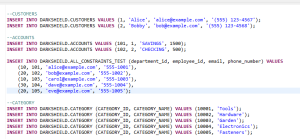
In the latest release of IRI DarkShield, .sql files are now supported for data discovery and masking. The ability to handle .sql files in DarkShield gives users the ability to mask sensitive data in backup files when it is not possible to allow DarkShield access to the database directly.
Handling .sql files is done no differently than any other type of file in a DarkShield Job. Just be sure to indicate this file type among any others that DarkShield will search and mask from the defined on-premise and/or cloud folders it reads.
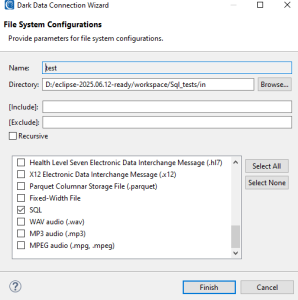
To learn how to create a DarkShield File job from the Workbench GUI, read this article or watch this video.
Before DarkShield
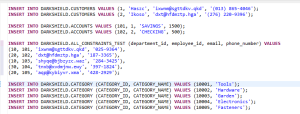
After DarkShield
This example shows the application of format-preserving encryption (one of many available, data-class-specific IRI masking functions) on the name, email and phone number values in the insert statements:
Frequently Asked Questions
Can DarkShield mask PII in SQL dump files?
Yes. DarkShield supports .sql files for sensitive data discovery and masking. This allows users to protect PII in exported database backups without giving DarkShield direct access to the source database.
How does DarkShield process SQL files?
DarkShield handles .sql files like other supported file types. Users include the SQL file type in a DarkShield File job and specify the local, network, or cloud folders that DarkShield should search and mask.
What PII can DarkShield mask in SQL files?
The article demonstrates masking names, email addresses, and phone numbers stored in SQL INSERT statements. DarkShield applies data-class-specific masking functions to the sensitive values it finds.
Which masking function does the SQL file example use?
The example uses format-preserving encryption to protect the name, email, and phone number values in the SQL statements. DarkShield also supports other data-class-specific masking functions.
For help with data classification (discovery) and masking of PII or other sensitive data in SQL files (or other sources – structured, semi-structured, or unstructured), please email darkshield@iri.com.