Data Class & Rule Library in IRI Workbench
HIPAA, GDPR, FERPA, and other data privacy laws require organizations to protect personally identifiable information (PII) and related sensitive data from disclosure or discovery. IRI organizes lists of sensitive PII into easy-to-understand groups called Data Classes, including emails, names, phone numbers, and other data types.
This article explains Data Classes and the Data Class & Rule Library in depth. It explains how users define and store Data Classes and data masking Rules in the IRI Workbench Data Class & Rules Library. Once stored, IRI Voracity job-building wizards can access that information. These include wizards for FieldShield, DarkShield, CellShield EE, RowGen, and NextForm, as well as the FieldShield Schema Data Class Search or Directory Data Class Search wizards.
A Data Class & Rules Library is different from a Data Class Map. A Data Class Map is the final product of a pre-FieldShield Schema Data Class Search or Directory Data Class Search. Those wizards use a Data Class & Rules Library to perform data classification and create further-modifiable mappings of Rules to fields in structured targets. IRI also provides AI-driven data classification for databases as part of this classification ecosystem.
Editor’s Note: This article supersedes earlier documentation on Data Class creation in IRI Workbench versions downloaded before December 2023. An upcoming article will cover automatic migration of existing Data Classes and masking Rules to the newer framework described here.
What is Data Classification?
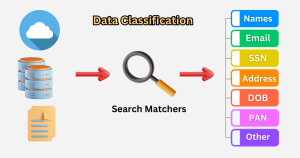
Depending on who you ask, the meaning of data classification may differ. At IRI, data classification refers to the act of cataloging and defining specific types of data – like email addresses, ID numbers, and company names – into unique, abstract categories of data called Data Classes, based on certain attributes or traits.
IRI Data Class and Rule Library
The IRI Data Class and Rule Library stores IRI Data Classes and IRI Rules in a single file.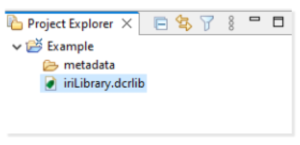
IRI Data Class (& Rules) Library Form Editor
Every new IRI Project in IRI Workbench includes an empty Data Class and Rule Library with a .dcrlib extension. Users create and store Data Classes and Rules in this library.
Every FieldShield and DarkShield job requires at least one Data Class in the project’s IRI Data Class and Rules Library. To create, edit, and remove Data Classes and Rules, you must use the IRI Library Form Editor. The IRI Library Form Editor provides a non-modal GUI for configuring the IRI Data Class and Rules Library.
To open the IRI Library Form Editor, double-click on the iriLibrary.dcrlib file inside your project folder. This opens the corresponding form editor in Workbench as a non-modal wizard page.
In the form editor, you can add Data Class Groups, Data Classes and their associated Search Matchers and default Rule, and also Rules not associated with any of the Data Classes. These unassigned Rules can later be used to overwrite the default Rule assigned to each Data Class.
Data Classes
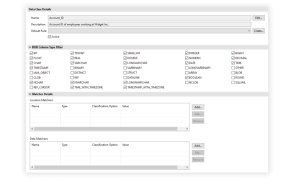
Data Classes give data architects and governance teams more granular control over what IRI considers, discovers, and treats as PII. Each Data Class consists of Search Matchers, a default Rule, and RDB Column Type filters, which apply only to relational databases.
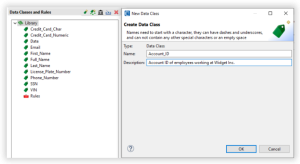
By default, a new IRI Project includes a Data Class Rules Library preloaded with several Data Classes and default Rules. To add a new Data Class to the library, double-click the green tag 
Note that there can not be multiple Data Classes with the same name. Click Ok and a new Data Class should populate the library.
For example:
 Data Class Groups
A Data Class Group contains related Data Classes. Each Data Class Group can have a default Rule assigned by the user.
When you assign a default Rule to a Data Class Group, any Data Class without its own default Rule inherits the group Rule. If a Data Class already has a default Rule, Workbench uses that Rule instead. In addition, grouping Data Classes can help with categorization and logging.
Another optional feature of Data Class Groups is the ability to further categorize Data Classes according to their level of sensitivity. Sensitivity level groups are Data Class Groups that use assigned priority levels. Higher priority groups typically have more restrictive masking functions assigned to them.
Only one Data Class can match a given element of PII. Therefore, the Data Class Group sensitivity level determines the matching order when similar Data Classes use different masking rules. When two Data Classes share the same name and Search Matchers but use different masking functions, the higher-priority sensitivity level determines which masking function applies.
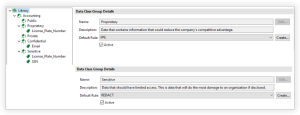
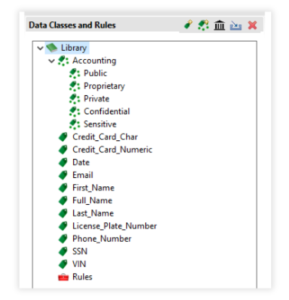
In the example below, the License_Plate_Number data class might be found in both Proprietary and Sensitive groups. Sensitive is the higher priority sensitivity level group, so in this case the redaction rule would be applied even though the License_Plate_Number was also part of the Proprietary group which had a default encryption rule assigned.
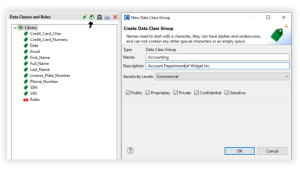
To create a Data Class Group, double click on the multi green tag 
Privacy Law Associated Data Class Groups
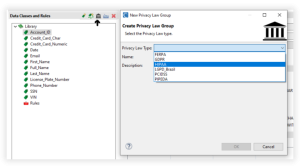
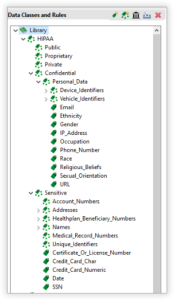
Privacy Law Groups are pre-populated Data Class Groups that provide a launching board for business rules to adhere to different privacy law requirements. These privacy law groups have pre-populated data classes, search matchers, and masking functions.
Note however that these specifications are provided for convenience, and may or may not identify every element or conform to specific data protection requirements.
Review and customization of these objects is therefore recommended to assure your job settings will address your particular needs.
To create a Privacy Law Group double click the courthouse 
Search Matchers
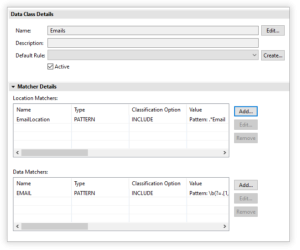
Currently, Search Matchers can be divided into two sub-categories: Location Matchers and Data Matchers. Location Matchers apply strictly to structured and semi-structured data and inspect the structure of data. Data Matchers, on the other hand, inspect the data itself to determine whether it matches the search attributes defined for the Data Class.
As a general rule, Location Matchers have better performance during matching operations and have better accuracy. The caveat is that Location Matchers are not available when working with unstructured data, since Location Matchers rely on a predefined structure to match on PII.
Unlike Location Matchers, Data Matchers can be used for matching against structured, semi-structured, and unstructured data. Data Matchers are very useful when PII can be found in free floating text. This includes but is not limited to, text files, Word documents, PDFs, images, and PowerPoint slides.
By using both location and data matchers simultaneously, you can find PII in your data source(s) by either source structure or data format. You can also use multiple Location Matchers and Data Matchers for greater certainty. However, additional matching attempts can increase discovery time. Without at least one Search Matcher, no matches will be found, and no grouping of data classes can occur.
The IRI Library form editor provides a section called Matcher Details which allows for the adding, editing, and removal of Search Matchers f rom individual Data Classes. Currently, Search Matchers are divided into two sub-categories: Location Matchers and Data Matchers.
The Matcher Details section supports the creation of multiple Location and Data Matchers.
Below are links to articles that discuss Location Matchers and Data Matchers in more depth, including how each are specified:
Data Class Default Rule
Any Data Class can store a default rule. A default Rule usually applies a masking function when no other Rule has been assigned to the Data Class. This provides a base level of protection for Data Classes that contain sensitive PII.
To create a default rule, select the Create… button to the right of the Default Rule label and a dialog will appear. There are three major types of rules: Data, Quality, and Section. Data rules is the most common type, and are used for data masking. At the top of the dialog, there is a filter section to expose masking rules which only relate to DarkShield.
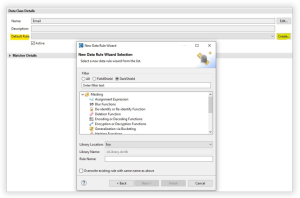
Once a rule is created, select the drop-down menu next to the Default Rule label and select a rule to be the default for that data class.

Rules Library
In addition to the default rule inside a Data Class, some rules can exist without being assigned to a Data Class during its creation. The Rules Library stores these unassigned Rules.
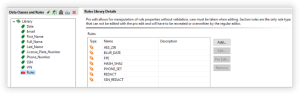
The rules in a Rules Library are available during the creation of an IRI job, and allow for the overriding of the default rule assigned to a data class if your application requires that. To access the Rules Library from the IRI Library Editor, click on the red toolbox next to the words “Rules”.
The editor displays the existing Rules. From the editor, we should also be able to add, modify, or remove rules as needed.
Rule Pro Edit
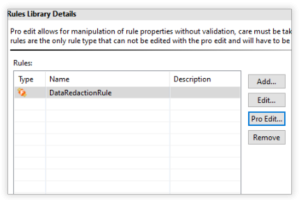
The Pro Edit option in the Rule Library editor allows for manual modification of Rules without the need to go through a wizard for that. This option helps those with advanced knowledge and the need for more freedom in alteration, like adding additional properties to a rule.
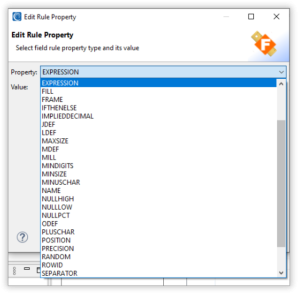
One example use might be changing the data type in a target column (within a FieldShield job script). Clicking Pro Edit opens a page for editing a rule’s properties.
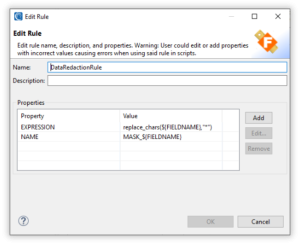
From this page, you can add, modify, or remove Rule properties. Pro Editor also allows you to change or add properties that you couldn’t through the standard creation of rules.
Example 1: You can add a property that changes a field’s data type when Workbench generates a SortCL job (e.g., FieldShield data masking) script.
Example 2: You can edit the expression to use an if-then-else statement, which Workbench then generates in the job script.
Using this wizard requires knowledge of IRI data rules and their possible properties. That said, all IRI rule properties and expressions are documented SortCL program options in the CoSort manual.
Re-Using and Sharing Data Classes and Rules
Once you define your Data Classes and Rules in an iriLibrary.dcrlib file, you can reuse them in other projects. To do that, simply copy this file into additional projects.
In this way, you can apply the same masking rules to like data classes you encounter in different projects. And remember, it is the consistent application of the same deterministic masking rule to the same data classes that preserves referential integrity in your targets.
Note too that some of the new job wizards, particularly those in DarkShield, allow you to specify a particular library even from another project folder. This means copying the library would not be necessary.
Re-using data classes and rules is particularly useful in IRI FieldShield data discovery and masking projects that are defined for different schemas. This is because database test data consumers need each unique original value masked the same way across multiple lower environments.
Library re-use is also useful in multiple IRI DarkShield projects built with its different search and mask wizards for files, healthcare documents, relational and NoSQL databases. This again is because enterprises with sensitive data in heterogenous sources also need consistently masked values.
Sharing these libraries also helps IRI software users reuse the same Rules in their own Workbench workspace. In a less formal, non-governed environment, you can create one or more library files with a .dcrllib extension and send them as needed as you would any other file.
A better practice would be to share these files along with other applicable and permissible project artifacts through a secure repository integrated with IRI Workbench such as Git. See this article on sharing IRI data management jobs to fully understand and implement this approach.
Import From Old Data Class Library and Rules Library
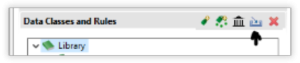
Before IRI Workbench supported the Data Class and Rule Library (.dcrlib), it used separate Data Class and Rules libraries. Later Workbench changes made those older libraries incompatible. Therefore, users needed a way to migrate their existing work into the newer format.
The Data Class and Rules Library now supports the import and conversion of content from the older versions of the Data Class Library and Rules Library:
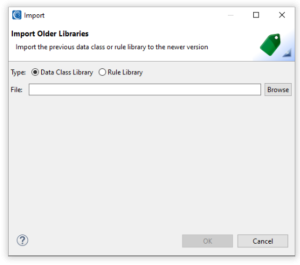
Documentation of this functionality is available in this article.
Frequently Asked Questions (FAQs)
What is PII data classification?
PII data classification is the process of identifying, labeling, and protecting personally identifiable information based on its sensitivity. This helps organizations apply the right level of security controls and comply with data privacy laws like GDPR, HIPAA, and CCPA.
How does PII data classification support compliance?
By categorizing sensitive information, organizations can apply targeted security measures, ensure lawful processing, and streamline audit trails. This supports adherence to privacy regulations that require strict handling of personal data.
What types of information are considered PII?
PII includes both direct identifiers (e.g., name, SSN, passport number) and indirect identifiers (e.g., date of birth, IP address, device ID) that can be used to identify a person alone or when combined with other data.
How are data classification levels defined?
Data is typically classified into categories such as public, internal, confidential, and restricted. These labels help determine who can access the data and what protections are required.
What challenges can arise in classifying PII?
Common challenges include identifying PII within unstructured data, maintaining consistent classification across systems, adapting to evolving regulations, and integrating classification into legacy environments without disruption.
How does data discovery help with PII classification?
Data discovery tools automatically scan files, databases, and documents to locate PII. This enables organizations to detect sensitive data across environments and tag it for classification and protection.
Can PII classification improve data security?
Yes. Classification enables organizations to apply precise encryption, masking, and access controls only where needed, reducing both risk and resource usage while enhancing overall security posture.
What are best practices for PII data classification?
Effective practices include comprehensive data discovery, a well-defined classification schema, ongoing monitoring and updates, employee training, and automation through specialized tools.
How can organizations maintain classification accuracy over time?
Data must be regularly reevaluated since its sensitivity can change. This requires continuous updates to classification rules, automated detection systems, and policies for reclassification.
What role does IRI play in PII data classification?
IRI tools like FieldShield, DarkShield, and CellShield EE support structured, semi-structured, and unstructured data discovery and classification through their Workbench IDE. Users can define data classes, automate discovery with matchers, and apply consistent masking rules across sources.
How does IRI ensure consistent masking across different data sources?
IRI uses deterministic masking rules tied to defined data classes. This ensures the same original value gets masked the same way across all systems, preserving referential integrity enterprise-wide.
Can IRI tools classify PII in both on-premises and cloud environments?
Yes. IRI Workbench enables multi-source discovery and classification for data stored on-premises or in the cloud. Its matchers detect PII using metadata, regular expressions, lookup files, and AI models.
How does data classification relate to data governance?
PII classification strengthens governance by making data easier to manage, secure, and audit. It provides visibility into where sensitive data resides and how it’s being handled across the organization.