Masking PII in Audio Files
Voice recordings can contain personally identifiable information (PII), such as names, phone numbers, or other sensitive data embedded in spoken words.
According to Mediartis, “The CNIL (French GDPR Supervisory Authority) provides examples of personal data such as photos, voice recordings, first or last names, pseudonyms, dates of birth, telephone numbers, social security numbers, postal addresses, email addresses, fingerprints, retinal prints and more”.
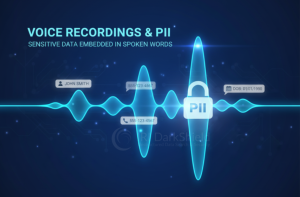
Voices themselves qualify as a form of personally identifiable information (PII); voice prints are one such example. Aside from the voice itself, the content of a conversation can also contain PII. The ability to remove PII from audio streams helps users take one step closer to addressing the myriad data security regulations that govern the protection of personal information.
DarkShield and Unstructured Data
IRI originally entered the data security theater with the introduction of IRI FieldShield, which focused on masking structured data while providing many of the ETL features associated with SortCL.
As data privacy requirements expanded to include semi-structured and unstructured data, FieldShield alone could not meet those demands. That led to the creation of DarkShield; designed to discover and protect sensitive data across a wide range of formats, both on-premise and in the cloud.
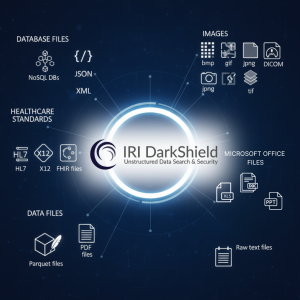
DarkShield can find and mask data classified as sensitive in structured sources (flat files and relational databases), too, but supports these additional sources on-premise and in the cloud:
- NoSQL DBs
- JSON, XML, HL7, X12, FHIR files
- Parquet and PDF files
- Microsoft Office files (Word, Excel, and PowerPoint)
- Raw text, log and .SQL files
- Images (bmp, gif, jpg, png, tif, DICOM)
DarkShield can also detect and redact signatures found in several file formats, and protecting handwritten PII is also on the roadmap.
Introducing Audio File Masking
Until now, DarkShield supported various file types containing text or images from which text could be extracted. With Darkshield version 1.6.7, IRI has expanded that support to include audio files.
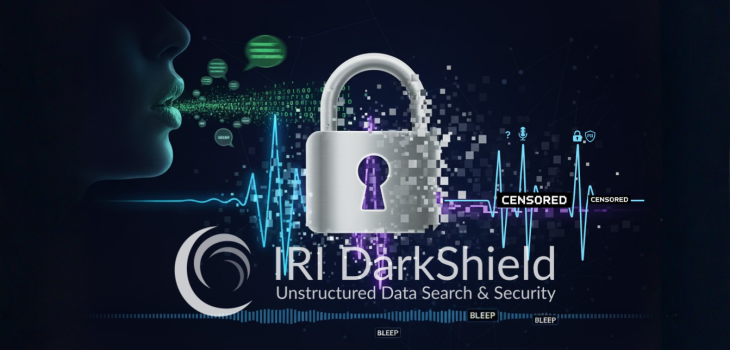
DarkShield achieves this by using a Speech-to-Text model called Whisper (made by OpenAI) to produce transcriptions. The transcriptions are then scanned for PII, and when found, the audio sound bytes containing PII are modified.
Current audio file formats supported by DarkShield include:
- .wav
- .mp3
- .mpeg
DarkShield Audio Rule: How Audio Masking Works
From the IRI rules dialog in the IRI Workbench GUI for DarkShield shown here, we can create and apply an Audio Manipulation rule to mask any PII found in audio files.
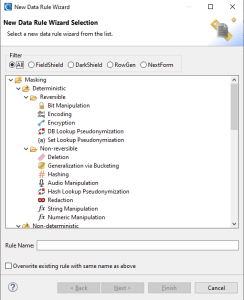
To create a rule for the purpose of masking PII in audio, there are now new Audio Manipulation rules. These rules allow you to either replace audio sounds or delete slices of audio sound.
To configure and create these rules, open an IRI Library and open the New Data Rule Wizard dialogue. Then select the Audio Manipulation item, and click next.
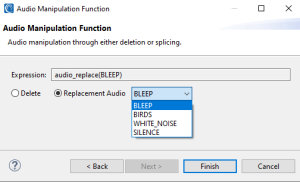
On the next page, either select to delete or replace audio via the corresponding radio button.
If you select the Replacement Audio option, you can choose between using bleeps, bird sounds, white noise, or silence to replace audio sound bytes. Otherwise, the Delete option will simply slice and cut out the sound bytes containing the discovered PII.
Searching an Audio File
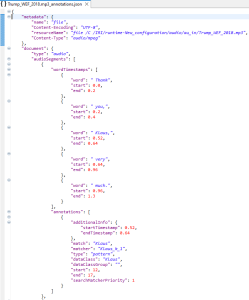
To discover PII inside an audio file, we leverage data classes as we normally would when creating a DarkShield job. Once a DarkShield .dsc file is created, we just run a Search job.
In my example, I have a data class called Klaus that only looks for the name Klaus in a speech performed by former president Trump. Below you can see a sample of the search results annotations json log from DarkShield.
Search and Mask an Audio File
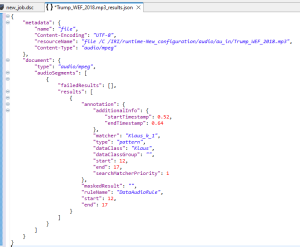
To mask PII inside an audio file, we leverage data classes to find PII and masking rules to mask PII as we would normally do when creating a DarkShield job. Once a DarkShield .dsc file is created, we just run a Search and Mask job.
In my example, I have a data class called Klaus that only looks for the name Klaus and replaces the word with a bleep sound. Below you can see a sample of the search and mask results JSON log from DarkShield.
Audio Clip: Before & After Masking
Sample clips showing the difference before and after masking.
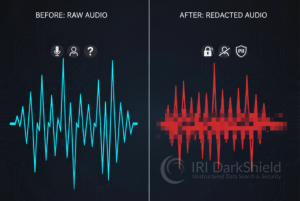
Audio clip before masking (original recording):
Masked audio clip (beep sound applied):
Masked audio clip (bird sound applied):
Frequently Asked Questions
What audio file formats can IRI DarkShield mask?
DarkShield currently supports .wav, .mp3, and .mpeg audio files for PII discovery and masking.
How does DarkShield find PII in audio files?
DarkShield uses OpenAI’s Whisper speech-to-text model to transcribe the audio. It then scans that transcription with DarkShield data classes to identify sensitive values.
What happens after DarkShield finds PII in the transcription?
After DarkShield identifies PII, it modifies the corresponding audio segment. The masking rule determines whether DarkShield replaces or removes the sound bytes containing the sensitive information.
What replacement sounds can DarkShield use for audio masking?
An Audio Manipulation rule can replace sensitive speech with bleeps, bird sounds, white noise, or silence. DarkShield can also delete the audio segment entirely.
How are audio masking rules configured?
Users create Audio Manipulation rules in the IRI Workbench Data Rule Wizard. They can choose whether to delete sensitive audio or replace it with another sound.
How does DarkShield decide what spoken information is sensitive?
DarkShield uses data classes to define what PII or sensitive values to search for. These data classes can then be paired with masking rules in a DarkShield job.
Can DarkShield search an audio file without masking it?
Yes. A DarkShield Search job can identify PII in the audio and write the findings to the annotations JSON log without modifying the source audio.
Can DarkShield search and mask audio in the same job?
Yes. A Search and Mask job can identify sensitive speech and apply the assigned masking rule in one workflow.
Does DarkShield support other unstructured data besides audio?
Yes. DarkShield also supports formats such as PDF, Microsoft Office files, images, raw text and logs, SQL files, Parquet, JSON, XML, HL7, X12, FHIR, DICOM, and more.
Why use audio masking instead of only storing the transcript securely?
The transcript may reveal where sensitive information occurs, but the original audio still contains the spoken PII. Audio masking changes or removes those sound segments so the protected audio itself no longer exposes the sensitive content described in the article.