Fabricating PII
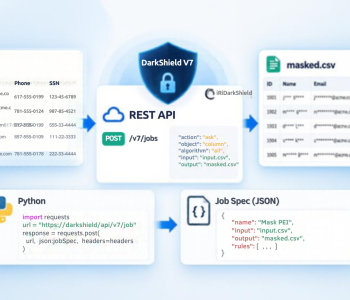
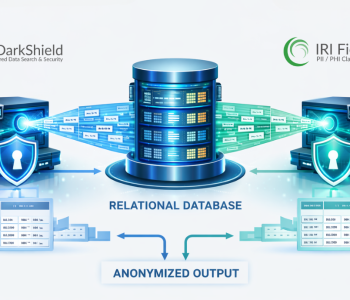
IRI’s Identity Fabrication Rule creates realistic, deterministic test PII from a single input value and seed. You can use it in IRI FieldShield or DarkShield jobs to generate related mock identity values for masking and test data workflows.
What Is the IRI Identity Fabrication Rule?
The Identity Fabrication Rule is a deterministic, non-reversible data masking rule. It can create realistic test PII for an entire record from one original value. The new function, configurable from IRI Workbench, creates meaningful and unique new values by pseudonymizing an initial value (e.g., a name), and synthesizing other values alongside it.
The rule creates mock data from one input value and a seed value. You can use the Identity Fabrication Rule in either IRI FieldShield or IRI DarkShield data masking jobs.
For example, let’s say you want to mask the name Tom in every database and file where “Tom” appears – but not just to some random value, but to another realistic-looking name. This is where the Identity Fabrication rule shines.
By passing a name, seed value, and expected return type, you can synthesize a new mock identity for “Tom”. The rule does more than replace Tom’s name. It also creates additional mock PII that you can use to mask other identifying information associated with Tom.
With just that one name, the fabrication function will create fake, but realistic PII associated with “Tom”. So it will not only replace every instance of Tom with Carl everywhere, but also create a fake Last Name, Phone Number, SSN, and more, just using “Tom” as the input source.
Note that you do not need to use any or all of the new mock information. The rule makes this additional mock information available, but you only use the values you request.
Also note that if you need more granular fabrication of PII, there are ways to construct it through a mix of masking, lookup and synthesis functions. See this article called ‘How to Build Realistic but Fake PII‘ for an example
How is the Identity Fabrication Rule helpful?
Using the example and information below, we can use this single rule to cover most of our important PII. Let’s take this fake RDB table for example.
Using a Primary Key as the Input Value
| ID Num (PK) | First Name | Last Name | SSN | State | City |
| 1 | Tom | Baker | 111-11-1111 | Texas | New York |
| 2 | Mike | ||||
| 3 |
In the table above, I am giving a few examples of where this rule would be useful. We can use any of these values to use as our deterministic lookup value, meaning, if I want to use the values from FirstName to mask/generate data, we can do that.
Alternatively, in this situation, a better use would be to use the ID Num column, which contains values for all users, even if the other columns are not populated. For the records, I will be using the same rule, just asking for different return values.
I do not want to mask column 1. Because it is the Primary Key (PK), it provides a unique value for each record. Therefore, I will use it as the input value.
Identity Fabrication Rule Examples
Inside the job specifications, FieldShield (CoSort SortCL)/FIELD statements or DarkShield configuration (.dsc) files can use the rules as follows:
Column 2, First Name:
rule_name(“fname”, ${fieldname}, “seedValue”), where ${fieldname} == 1
(for this specific column + record).
Column 3, Last Name:
rule_name(“lname”, ${fieldname}, “seedValue”), where ${fieldname} == 1
(for this specific column + record).
The same pattern applies to the remaining fields. For records 2 and 3, the function passes ${fieldname} as 2 and 3, respectively.
Example Fabricated Output
Below would be the output in a database table, for example:
| ID Num (PK) | First Name | Last Name | SSN | State | City |
| 1 | Brian | Lane | 829-01-8932 | Illinois | Houston |
| 2 | Serena | Points | 374-57-8257 | Pennsylvania | San Diego |
| 3 | Mary | Moore | 192-83-7420 | Georgia | San Jose |
Even when source values are missing, the rule creates additional test data from the database PK.
Using Identity Fabrication with Free-Floating Text
The same concepts apply to any source, including files, NoSQL DBs, etc. If a file contained free-floating text that contained “The patient in question was Robert Milnn.” We can use this rule to replace both the First Name and the Last Name by just asking for a different return type. So our new masked text would become “The patient in question was Benny Suiin.”
How to use the Identity Fabrication Rule?
Configure the Rule in IRI Workbench
You can find this rule in the New Data Rule wizard in IRI Workbench, and called from the Data Class and Rules Library (iriLibrary.dcrlib), where all other rules reside. The exact location is under Masking -> Deterministic -> Non-reversible -> Identity Fabrication:
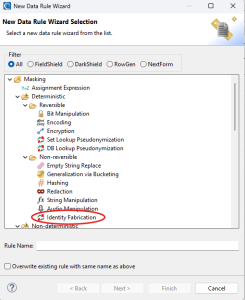
After selecting the “Identity Fabrication” rule, a new window will appear:
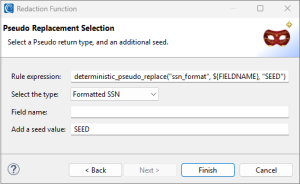
In this dialog, you would add a field name if you know the name of the field that you want to reference. If you do not know the field name, leave it as i,s, and the rule will use the current field value instead. You can also specify any ASCII value to act as a seed value.
Set a Seed Value for Deterministic Output
The seed value maintains consistency, or determinism, between the input data and expected output. For example, if I pass in the word Tom with no seed value, I might get Carl. The next time, Tom might be replaced with Trisha instead.
If I specify the same seed each time, however, Tom would be Chris (for example) each time I run the job. Deterministic values that work from job to job support referential integrity in, and “golden copies” of, test data targets.
Choose the Return Type
The selected type option determines the type of value the rule returns. In the image below, for example, the rule will return a value that looks like a formatted Social Security Number (xxx-xx-xxxx).
The options shown below let you choose a different return type:
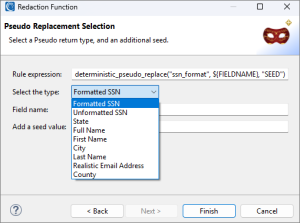
After making your selection and clicking Finish, you can use the rule in a FieldShield or DarkShield job.
Frequently Asked Questions
What does the IRI Identity Fabrication Rule do?
The Identity Fabrication Rule creates realistic, deterministic test PII from a source value and seed. It can generate related mock identity values for use in FieldShield or DarkShield masking jobs.
Is the Identity Fabrication Rule reversible?
No. The rule is deterministic but non-reversible. Using the same input value and seed produces consistent fabricated output without exposing the original value.
Why does the Identity Fabrication Rule use a seed value?
The seed helps maintain deterministic output. When you use the same input value and seed, the rule can return the same fabricated result across jobs, which helps preserve referential integrity in test data.
Can the Identity Fabrication Rule create multiple types of mock PII?
Yes. The rule can return different fabricated identity values based on the selected return type, such as names, Social Security numbers, email-related values, states, countries, and other supported types described in the article.
If you would like a walkthrough on how to run any of these jobs, please see the links below: