How to Mask PII in a Database
First released in 2011, IRI FieldShield is a database data masking tool that helps organizations classify, discover, and de-identify personally identifiable information (PII) and other sensitive data in structured relational database (RDB) sources.
FieldShield also supports fixed and delimited files, flat XML and JSON, Excel, and ASN.1 Call Detail Record (CDR) files. For additional data sources, including semi-structured and unstructured information, IRI DarkShield provides complementary discovery and masking capabilities. 1
This article explains the typical steps FieldShield users follow to connect to databases, classify sensitive information, discover PII, configure masking rules, run masking jobs, and audit the results. It also links to related IRI technical articles that provide more detailed instructions for individual steps.2
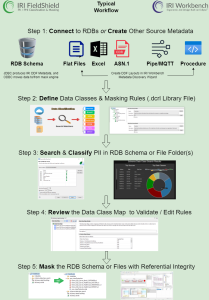
The following diagram illustrates the most common FieldShield data masking workflow.
Step-by-Step: How to Mask PII in a Database
FieldShield users typically follow nine steps, from establishing database connections to monitoring and maintaining masking jobs.
The diagram below summarizes these stages.
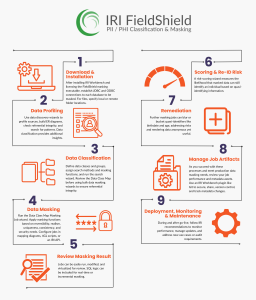
Step 1: Connect to Your Database
After installing IRI Workbench and licensing the FieldShield masking executable, establish both JDBC and ODBC connections to each database you intend to mask.
These connections enable FieldShield to access the database sources used in subsequent discovery, classification, and masking operations. For file-based sources, identify the corresponding local or remote folder locations.
Step 2: Discover and Profile Sensitive Data
Use the wizards in the IRI Workbench Data Discovery menu to examine your database sources.
These tools allow you to:
- Profile database contents.
- Build entity-relationship (E-R) diagrams to model relational database schemas.
- Perform referential integrity checks.
- Search for specific values that match defined patterns.
Although these discovery methods help identify sensitive information, FieldShield’s data classification capabilities provide a more comprehensive approach. By organizing related sensitive values into data classes, you can discover PII across database schemas and prepare consistent masking rules.
Step 3: Define Data Classes and Masking Rules
Define data classes for the sensitive information you need to discover and protect.
For example, individual data classes may represent passport numbers, names, or telephone numbers. You can also organize related classes into groups, such as citizen PII.
Assign appropriate search methods and masking functions to these classes. Then use the data class search wizard to scan your database schema or file folders.
The resulting search jobs produce several outputs:
- Log reports documenting discovery results.
- Dashboard charts summarizing detected sensitive information.
- A Data Class Map showing the identified data classes and their locations.
Review the Data Class Map before proceeding with bulk masking. FieldShield masking wizards use this map to apply the assigned rules consistently to corresponding data classes. This consistency is particularly important when the same sensitive values appear in multiple tables and must retain referential integrity after masking.
Step 4: Configure and Run a Data Class Map Masking Job
Once the Data Class Map is ready, use the appropriate masking wizard in IRI Workbench.
For relational databases, select New Data Class Map DB Masking Job …
For file-based sources, select New Data Class Map File Masking Job …
During job configuration, assign a default or selected data masking function to each data class. Choose the masking method according to your requirements for:
- Reversibility: Whether authorized users need to recover original values.
- Realism: Whether masked values must retain realistic characteristics.
- Uniqueness: Whether output values must remain distinct.
- Consistency: Whether identical source values must receive consistent masked results.
- Security: Whether the masking method provides the required level of protection.
FieldShield supports several masking methods, including encryption, hashing, pseudonymization, randomization, redaction, blurring, and bucketing. You can also configure masking jobs through mapping diagrams, fourth-generation language (4GL) scripts, or an IRI API. For a detailed example, see Masking PII in a Relational DB with FieldShield.
Step 5: Test and Refine Your Masking Jobs
After creating a masking job, run it and review its output before moving into broader deployment. FieldShield supports iterative testing, allowing you to modify and rerun jobs as needed.
You can initially virtualize output to the console, direct it to files, or write it to sample tables. These options support reviewing, modifying, sharing, and reusing job results. Masking logic can also be incorporated into SQL query and update workflows.
Depending on the implementation, these workflows can support real-time or incremental masking operations. This flexibility allows you to refine your masking configurations without treating the initial job as a final production deployment.
Step 6: Evaluate Re-Identification Risk
Masking directly identifying PII does not necessarily eliminate every privacy risk in a dataset. Some remaining values, known as quasi-identifiers, may still enable an individual to be identified when combined with other information.
FieldShield includes a re-identification risk-scoring wizard that statistically evaluates the likelihood that a masked dataset or table could still identify an individual. Use this analysis to assess residual privacy risk after the initial masking process. The resulting risk scores can help identify where further data protection measures may be necessary.
Step 7: Apply Additional Masking to Quasi-Identifiers
If the re-identification risk report exposes remaining vulnerabilities, create additional masking jobs to address them.
FieldShield supports techniques such as blurring and bucketing for quasi-identifying values, including birthdates and ages. These methods reduce the precision of sensitive values while retaining information that may still be useful for the dataset’s intended purpose.
Additional anonymization can therefore help reduce re-identification risk without necessarily removing all analytical value.
Step 8: Manage and Version Control Masking Jobs
As masking projects progress from testing into production, review both job performance and the metadata assets supporting those jobs.
These assets may include:
- Source data layouts.
- Task and batch scripts.
- Encryption keys.
- Other masking job configuration resources.
Using an IRI Workbench plugin such as Git, teams can share, secure, version control, and track changes to masking job metadata. Version control also helps maintain visibility into job modifications as masking requirements and implementations evolve.
Step 9: Monitor Performance and Maintain Compliance Workflows
After deploying masking jobs, continue monitoring their performance and operational results. Database contents, masking requirements, conditions, and software environments may change over time.
IRI recommends maintaining masking processes by monitoring performance, managing updates, reviewing new use cases, and addressing evolving audit requirements.
These activities help keep data masking operations aligned with production and test environment requirements after the initial deployment.
Where Can You Apply Database Masking?
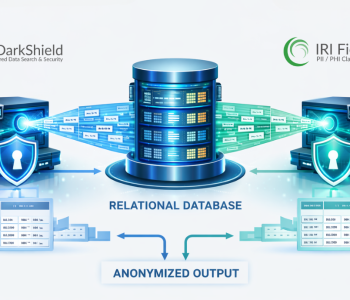
FieldShield can mask data in production or test database schemas. Users define the sources, targets, and processing flow according to their requirements.
A common implementation uses an extract, transform, and load (ETL) process:
- Read data from a production database.
- Apply masking functions in the processing engine.
- Write the masked output to a test database.
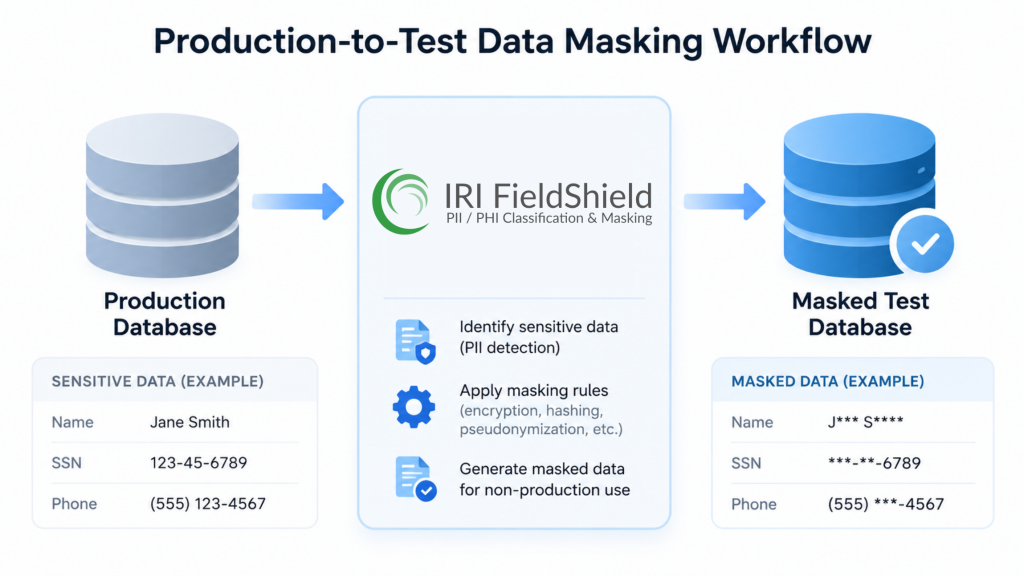
This approach allows organizations to create masked test environments using source data from production while applying the required de-identification rules during processing.
Watch a typical FieldShield database masking job: FieldShield masking demonstration on YouTube
What’s Next After Masking PII?
After completing a FieldShield database masking job, you can perform additional validation, automation, integration, and auditing activities.
Validate Masked Data and Review Audit Logs
Validate the output in your target tables to confirm that the masking results meet your requirements for privacy, realism, and referential integrity. You can also review discovery logs, masking job logs, and performance information to evaluate execution results.
For additional privacy analysis, use FieldShield’s re-identification risk-scoring functionality. This is particularly relevant when applying the HIPAA Expert Determination method.
If the analysis identifies residual risk, create additional anonymization jobs to obscure quasi-identifying information.
Automate and Extend Masking Workflows
FieldShield masking jobs can be automated through an IRI job scheduler, another scheduling system, or a CI/CD pipeline. You can also modify existing jobs to include additional targets, filters, transformations, data quality (DQ) functions, and formatting operations.
For broader data management workflows, reuse FieldShield data classes and masking rules in:
- Database subsetting
- IRI Ripcurrent replication and incremental masking
- IRI Voracity ETL jobs
- IRI DarkShield jobs
Finally, maintain your masking job artifacts using Git or another appropriate version control system to support collaboration and change tracking.
If you have questions or need assistance with database masking, contact fieldshield@iri.com.
Frequently Asked Questions (FAQs)
What is PII, and why should it be masked in a database?
Personally identifiable information (PII) includes names, Social Security numbers, telephone numbers, and other attributes that can identify an individual. Masking PII helps protect sensitive information against unauthorized disclosure and supports privacy requirements associated with regulations such as HIPAA and GDPR.
How does IRI FieldShield mask PII in relational databases?
IRI FieldShield classifies, discovers, evaluates re-identification risk, and de-identifies PII in structured relational databases. It uses data classes and masking rules to locate sensitive values and apply consistent transformations. Appropriate deterministic masking methods can also preserve referential integrity in masked target tables.
How do I connect FieldShield to a database?
Configure JDBC and ODBC connections in IRI Workbench. These connections support database profiling, classification, discovery, and masking operations involving connected database instances.
What are data classes in FieldShield?
Data classes represent categories of sensitive information, such as passport numbers, names, or email addresses. Each class can be associated with search methods and masking rules. FieldShield uses these definitions to discover matching values and apply consistent masking functions.
How does FieldShield preserve referential integrity during masking?
FieldShield uses data class mappings and consistent masking rules to help ensure that corresponding sensitive values remain consistent across database tables. Deterministic methods, including appropriate format-preserving encryption or consistent pseudonymization, can preserve relationships among masked values.
Which masking functions can FieldShield apply?
FieldShield offers static data masking functions, including encryption, hashing, pseudonymization, randomization, redaction, blurring, and bucketing. The appropriate function depends on requirements such as reversibility, realism, uniqueness, consistency, and security.
How can I validate and audit masked data?
Review FieldShield discovery reports, masking job execution logs, and audit information. You can also validate masked target tables and run re-identification risk scoring to evaluate whether quasi-identifiers present residual privacy risks.
How do I run a database masking job in FieldShield?
Create or review a Data Class Map, then select New Data Class Map DB Masking Job in IRI Workbench. Configure the data sources, targets, and masking functions before executing the job through the graphical interface or command line.
Can FieldShield mask data incrementally or in real time?
Yes. FieldShield masking rules can be applied during database replication and test-schema refreshes using IRI Ripcurrent, the change data capture (CDC) module in Voracity. FieldShield functions can also be incorporated into Voracity ETL jobs using CoSort SortCL, with data- or value-based conditions. These jobs may be integrated with applications, CI/CD workflows, or data virtualization environments.
How does FieldShield address re-identification risks?
FieldShield provides a risk-scoring wizard that statistically evaluates the likelihood of identifying individuals from masked datasets containing quasi-identifiers. Additional jobs can apply techniques such as blurring, bucketing, or generalization to reduce residual risk.
Can FieldShield work with other IRI products?
Yes. FieldShield data classes and masking functions can be reused in database subsetting, Ripcurrent replication, and Voracity ETL workflows. Field-level functions can also work with the DarkShield API to address semi-structured or unstructured data stored in relational database columns.
How can I automate FieldShield masking jobs?
FieldShield jobs can run through the IRI Workbench GUI, command line, or API calls. You can schedule and automate them using the IRI Workbench task scheduler, external scheduling tools, batch scripts, or CI/CD pipelines.
How does FieldShield support privacy compliance requirements?
FieldShield supports privacy programs associated with GDPR, HIPAA, CPRA, PCI DSS, and other requirements by helping organizations discover sensitive information, apply de-identification methods, and maintain auditable records.
FieldShield also supports data subject access request (DSAR) workflows involving information in relational databases, Excel spreadsheets, ASN.1-encoded CDR files, and fixed or delimited text files. These capabilities can support requests involving rectification, portability, and erasure.
Can teams share and secure FieldShield masking jobs?
Yes. IRI Workbench supports integration with version control systems such as Git. Teams can use these tools to share and track changes to masking scripts, metadata, encryption keys, and related job resources.
Where can I get help with FieldShield database masking?
IRI provides built-in Workbench help, product documentation, YouTube tutorials, and other self-directed learning resources. For direct assistance, you can email fieldshield@iri.com to get expert support.
- IRI DarkShield supports additional sources, including semi-structured and unstructured data in relational databases, NoSQL databases, EDI files, PDF and Microsoft documents, and images. It uses the IRI Workbench GUI and shares data class and masking rule concepts with FieldShield. You can also use DarkShield for RDB sources as well; see this FAQ for guidance vs. FieldShield.
- There is also help within the IRI Workbench GUI for FieldShield, YouTube videos, and product manual. Self-directed and IRI-supervised learning services are also available to expedite your solution.