

Home » Products » NextForm
File Format and Data Type Migration  
 
NextForm is a fast, affordable, and versatile data migration tool for converting file formats and data types.

Summary
NextForm is a powerful, but ease-to-use utility for converting large files into different formats, and/or translating field-level data into other types. Move between XML and text, LDIF and CSV, Vision and ISAM, MF COBOL variable length files and and Excel, etc. Or, use NextForm to convert EBCDIC to ASCII fields, packed decimal to numeric, etc., and to remap field sizes, delimiters, and offsets.
Features/Benefits
• Reformats huge files fast
• Converts > 100 data types
• Remaps field layouts
• Cross-compatible metadata
• Easy to learn and re-use
• Runs on Windows, Unix/Linux
• Low cost, volume discounts
Introduction
Do you need a quick way to convert your file structures ... from or to these forms?


Have you tried other file format conversion tools (especially for XML and LDIF) that cannot handle large volumes? Or, do you simply need to reformat files by changing their field layouts from fixed to variable (or vice versa), move fields around, use only certain fields on output, or create multiple output files (and formats) from a single input format?

Or, do you need to convert field data types within your files ... from or to these forms?


If you answered yes to any of these questions, you may want to evaluate NextForm, the only data migration tool that leverages the power and simplicity of CoSort's high-volume data transformation and definition technologies.

* VSAM file conversions may require Clerity software.
Description

NextForm runs from a Java GUI called 'NextForm Builder' or from the command line, using simple text scripts that describe the process type (format) and field layout of your input and output files. NextForm supports all the file formats listed above, though XML elements must conform to a flattened structure. All the above data types are also supported on input for conversion purposes. Please email IRI if you have any questions.

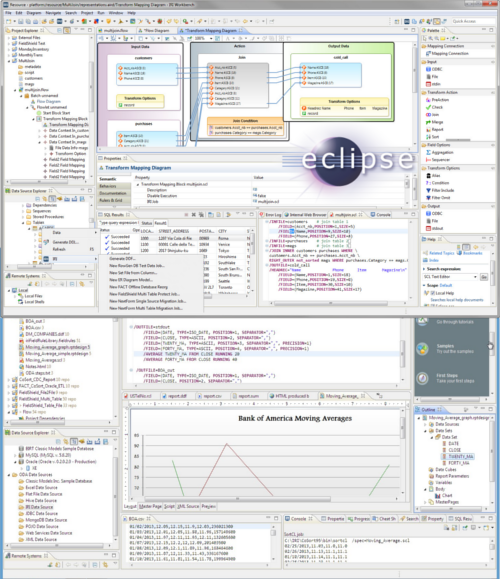
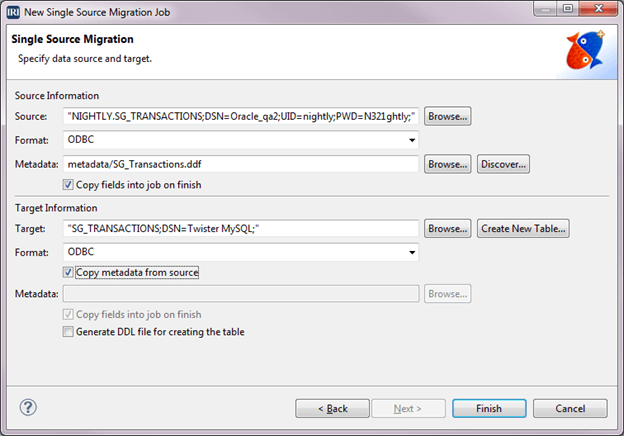
NextForm Builder provides a wizard to guide you through the simple transformation process. The wizard recognizes the field layouts of XML, LDIF, CSV, and other delimited files to automate job definition. 

NextForm Builder

With NextForm Builder, you can open and edit the job scripts that you or the wizard creates, or export the scripts for special edits like multiple output file and format specification or external use. You can save jobs within projects, and run them from the GUI.

You can also run a NextForm job script from the command line, batch script, or system call from your application program. NextForm job scripts contain the layout of the input and output files. The are text scripts written in the "NextForm Control Language" or .ncl. To run a job, simply enter (or schedule) this command:

  NextForm /spec=scriptname.ncl

The script will produce all the output files and formats specified. For more examples with input data, click on the Job Samples in the file format-specific pages linked in the Introduction (above).

Platform Availability
The NextForm engine runs on Windows, Unix and Linux command lines. The NextForm Builder (GUI) is currently running on Windows.


Compatible Applications
NextForm uses the same data definition file (.ddf) metadata format as the CoSort SortCL program, so you can use the same file layouts in CoSort if you want to run field-level data transforms (like sort, join, aggregate) or produce detail and summary reports against your input file data. NextForm file layouts can also be used in the FieldShield program to protect (encrypt, mask, etc.) personally-identifying data at the field level, or in the RowGen program to generate test data in the same format as your input or output files.

Fast Extract (FACT) for Oracle and DB2, also available from IRI, will create NextForm-compatible .ddf files during parallel table unloads from these databases into flat file forms. That way, you can export your table data and use NextForm to convert the file formats and/or data types for database or application migrations.

Finally, by supporting IRI's .ddf format, the Meta Integration Model Bridge (MIMB) application from Meta Integration Technology, Inc. (MITI) allows you to leverage the file layouts already created for third-party modeling, ETL, EAI and BI tools. MIMB automatically converts their file definition metadata into the data definition file metadata NextForm uses so that you can use NextForm without having to manually redefine your fields.


Evaluation, Licensing and Support

A one-time, 15-day trial handles high volumes but randomly drops records from the output. For a free trial package, click here to obtain a download link via email.

A permanent key on Windows is currently US$400 for the first copy regardless of Windows hardware sizing, $300 for the next, and $200 for the third and successive copies. Additional fees apply on Unix/Linux and for COBOL index file support. Please email nextform@iri.com for more information.

Visa/MC and purchase orders are accepted. Each license is use-restricted to a single computer, and you may not sell, rent, loan, embed, distribute, transfer or otherwise encumber the software.

Email support is provided free for the first 45-days after installation. While it does not include data profiling, the service includes reasonable assistance with job scripting so you can perform metadata-consistent conversions.

make text smaller make text larger print this pageemail this page
» Resources
» Next Steps
1-800-333-SORT
1-321-777-8889
Did you find what you were looking for on this page?
YesNoUnsure

What you were looking for:

Include your email address if you would like a response.