
Home » Products » RowGen
Safe, Realistic Test Data & File Generation 
 
What Beats Real Data?

RowGen'd data may be better than real data. Why? Because real data may:

  • not yet exist. RowGen allows you to work on any subsequent phase of a project before an earlier phase is completed, since you do not have to rely on the real data from an earlier project phase.

  • be confidential. RowGen allows you to realistically simulate and outsource real data and/or file formats which may not be available for compliance, security, or other reasons.

  • not be robust enough for testing and development. RowGen's simulated data can produce any potential range of data values and volumes so that you can stress your application at the limits of what's possible in the future.

RowGen™ is the fastest and most versatile test data solution available today. With RowGen, you can build an entire database with referential integrity in a single operation -- without using production data -- along with a wide variety of custom-formatted test files and reports that contain safe, intelligent test data. RowGen uses your existing file and database metadata, features parallel transformation, formatting, and generation functions, and produces an audit trail for version control and privacy law compliance.

Summary
RowGen v3 creates massive amounts of accurate, relational test data in the same table, file, and report layouts used in production. RowGen uses the data definitions you already have -- or create on the fly -- to quickly set up test database and data warehouse operations, prototype your applications, benchmark different platforms, and outsource work formats.
Features/Benefits
• High performance in volume
• Easy-to-use 4GL and Eclipse GUI
• Preserves referential integrity
• Uses DDL, DDF investments
• CoSort inside speeds DB loads
• Realistic data values and ranges
• Perfect file/report formatting
• Reduces complexity and risks

Introduction
With the right test data, you can:
  • successfully develop and stress-test new applications
  • prepare for operational database and query optimization scenarios
  • prototype data warehouse ETL/ELT jobs and database migrations
  • safely share or outsource report or file samples without NDAs
  • run performance benchmarks on new hardware and software
To meet these goals, you must be able to create large volumes of realistic test data that conform to complex business rules and privacy laws. The test data must have the same look and feel as production data, but not actually come from production because personally-identifying information would be exposed. You therefore need a way to build accurate but de-personalized test targets with the right data types, record formats, value ranges, row volumes, and inter-table relationships.

Until now, you would forgo adequate testing and make inaccurate suppositions and extrapolations, spend a lot of time writing custom 3GL or shell programs to build specific test sets with the layouts you want, or mask production data in ways that keep it safe, realistic, and referentially correct. Then you would have to repeat the process every time you needed different record or file formats, or different data types or value ranges. To get help, you could scour a low-end market of test data tools that cannot match RowGen's speed in volume or its functional versatility, or try relying on more expensive tools (or functionality in complex systems) that have only some of RowGen's capabilities.

IRI's RowGen software was created by data modeling, integration, and processing experts to save time and energy in the creation of perfect, safe test data sets in modifiable table, file, and report formats. With RowGen, you are immediately ready for development, benchmarking, and outsourcing.

RowGen combines a popular and convenient GUI with a powerful, self-documenting 4GL to help you automatically or manually create, transform, and format your test data in table, file, and report layouts that are realistic in their appearance, content, relationships, and volume. RowGen metadata is saved in explicit text scripts; a central repository of data definitions and manipulations that you can easily modify and re-use. RowGen can also produce an audit trail in XML format -- which includes all job metadata -- to help you track project lineage and verify compliance with privacy regulations.
Test Data for Everything and Everyone
RowGen is a complete solution for test data creation. Its core strengths are high data volumes and functional versatility. Consider how you can leverage these special product attributes to your advantage:

Multi-Source Mix and match real data with randomly generated data, using multiple selection criteria and > 120 different data types
Multi-Target Create many test (output) tables and/or files simultaneously and target your apps, BI simulations and bulk loads (automatically)
Model-Driven Leverage your existing DDL information to populate structurally and referentially correct test databases and data warehouses
Multi-Format Build test data directly in your field (e.g. phone, date, SSN), report and flat-file formats (e.g. COBOL, CSV, LDIF, web log, XML, line/record/variable sequential)
Multi-Function Manipulate and format test data while it generates with: sorting; aggregation; custom filters, layouts, and transforms; page/report formatting; EVs, etc.
Multi-Range Express or select from any set of real data, numeric range, or distribution of values (linear, normal, percent, custom)
Multi-Level Populate test data directly into custom-formatted detail and summary (drill-down and roll-up) reports that can operate on the test values
Multi-Platform Run RowGen on any current Unix, Linux, and Windows platform to use the power of your hardware and test data where you need it
Multi-Metadata Use the data layouts already defined in CSV headers, COBOL copybooks, SQL*Loader control files, ELF web logs, and MIMB-supported platforms
Multi-Purpose Deploy RowGen for application development and stress-testing, DB population, ETL prototyping, outsourcing, benchmarking, etc.
Multi-Partner Benefit from RowGen's technical alliances with the leading hardware, database, data integration, BI application, and metadata vendors


Test Database Targets
RowGen users can create structurally and referentially correct test data using their existing (or client-provided) DDLs for:
  • Oracle
  • Sybase
  • DB2 UDB
  • My SQL
  • SQL Server
  • Teradata
  • Packaged Apps (e.g. PeopleSoft, Informatica)
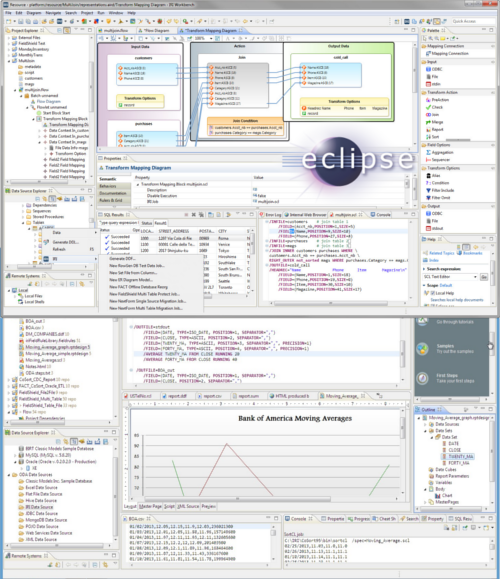
Specifically, the 'Create DB Test Data' wizard in the IRI Workbench GUI for RowGen, Built on Eclipse™, is used for:
  1. Parsing - table descriptions and integrity constraints are translated to test data generation definitions that reflect the source structures, column data types, and dependent sets
  2. Generation - pre-sorted flat files containing the test data are created for loads, and the definitions remain for modification and re-use
  3. Population - target tables are rapidly bulk loaded in the order necessary to maintain the same table relationships (referential integrity) that exist in production
During this process, RowGen users can also define independent table sizes, column separators, index values, and apply field-level rules to one or more tables that:
  • randomly select data from set files (custom, single-column, tab-delimited, or database-column-extracted)
  • contain specified string data (literal values)
  • draw data from any numeric range in provided (linear, normal, percent) or custom distributions
  • display custom 'compound data values' created one component at a time (e.g. phone number format)

These same field-level test data generation rules can be applied to individual table, flat-file and custom report targets in the RowGen GUI's 'Create Custom Test Data' wizard or by scripting the field definitions by hand. Whether created in the GUI or by hand, RowGen job scripts are available for re-use, application integration, and batch execution.


Test File and Report Targets
RowGen gives you complete control over the generation of target test formats. The 'Create Custom Test Data' wizard in the IRI Workbench GUI for RowGen, and the RowGen Control Language (RCL) job scripts the wizard produces*, define and run data generation and formatting together.

RCL scripts use the data and job definition syntax of CoSort's powerful Sort Control Language (SortCL) program to describe the precise layout, size, and content of the target file(s), down to the size, position, separator, and data type of each field element, as well as a myriad of conditional selection and set file/value support (for range testing). See the discussion of field value customization below.

Test files -- that you can create one or more at a time -- can be in any of these formats:
  • ACUCOBOL Vision
  • CSV (or other-Delimited)
  • ELF (W3C Extended Log Format)
  • LDIF (LDAP)
  • Line Sequential
  • Mainframe Variable Block
  • Micro Focus Variable Length (Small/Large)
  • Micro Focus I-SAM
  • Record Sequential (Text)
  • Variable Sequential
  • XML

RowGen will generate as many records per file, and as many files, as you specify in one job script and I/O pass. You can format each output file with customized field, record, and report layouts, and specify transformations like sorting, aggregation, and cross-calculation.

Test reports can contain header and footer records, detail and summary data, environment variable and special constants, and use condition logic for record selection and segmentation. And again because RowGen's RCL comes from CoSort's SortCL, RowGen delivers the same report generating capability for your test data that CoSort delivers for real data. For a complete list of built-in reporting features available in RowGen and SortCL, see:

Solutions > BI > Reporting_Functions1
Solutions > BI > Reporting_Functions2

*You can write and modify RCL job scripts with any text editor, in the RowGen GUI's syntax-aware script editor, or through GUI dialogs which interact with the script.

Intelligent Column (Field) Data
RowGen generates any number of rows with any number of columns. The columns can be in fixed or delimited position and contain values: in any supported data type that RowGen can randomly generate; you design or declare within a range; or, in a set file you have or create on the fly.

More specifically, RowGen can either randomly generate the data for each specified field in the type you declare, e.g.:
  • ASCII & EBCDIC Characters
  • Numeric, Whole, Currency, IP Address
  • Alpha & EBCDIC Digits
  • RM and MF COBOL Numerics
  • Other Binary Numerics
  • US, Europe, ISO, Japan Timestamps
  • Unicode & Multi-byte

or RowGen can custom-define or randomly select field values (with weighted and other frequencies) from one or more real set files or literal values and ranges. When using set files, RowGen offers several random selection methods (including inter-column permutation) to deliver both realism and personal data protection. This is especially important when set files with real names or other sensitive production data are in the mix.

See the discussion under creating Database Test Data above about field-level rules to see the kinds of options available for customizing and applying field-level intelligence and realism to test data.  Note also with RowGen, you can combine random generation and selection in the same creation operation to fine tune your test data to the highest possible degrees of utility and realism.

Beyond raw data generation, custom data definition, and real data selection, RowGen also supports field-level manipulations and masking, conditional value filters, and complex transformation routines that you can specify in the GUI's target field layout editor or manually in job scripts. Finally, RowGen users can write their own field-level generation or transform functions in any language with a C link and incorporate the routine(s) at runtime.


Working With Your Applications

RowGen users will find many different points of integration into their current operational environments.

One of the aspects of RowGen that makes integration easier is the self-documenting nature and cross-compatibility of its metadata. The data definition file (.DDF) format RowGen uses is common to all IRI software tools, and is supported throughout the IRI Workbench GUI, built on Eclipse. Metadata discovery and conversion functions produce new DDFs that RowGen and other IRI tools can use*, and free version control plug-ins in Eclipse support DDF metadata lineage and impact analysis. The universality of DDF within the IRI product suite allows you to easily transition between test data generation and real data processing jobs in CoSort (SortCL), FieldShield, and NextForm. RowGen DDF is also supported in Meta Integration Technology Inc.'s Meta Integration Model Bridge (MIMB). MIMB users can automatically convert the metadata in their database, ETL, data modeling, and related applications to RowGen DDF. MIMB users can thus more easily populate their applications with test tables, files, and reports used in production -- and with even broader value ranges for stress testing.

You can also use RowGen's built-in data transformation functions (such as expressions and aggregation) to test the functionality of your applications. For example, you can compare the results of your program's aggregation routine with the summary values that RowGen produced while creating the test data.

RowGen targets can be disk files, named or unnamed pipes (stdout), or one or more custom output procedures (that you write and link to RowGen). Direct the output to your database's load utility (pre-sorted!) or other applications for population, processing, or presentation. Again, your outputs can range from simple, one-field flat files to elaborately-formatted HTML reports complete with real-time system data.

Finally, you can easily embed RowGen processes into your applications and batch streams because the RCL specifications are in text files that you can create, embed, and execute as command line calls. This allows you to build test data generation into new and existing application environments.

*RowGen DDFs ar also created by the Fast Extract (FACT) tool for Oracle and DB2, and by IRI-supplied metadata converters for COBOL copybooks, CSV file headers, SQL*Loader control files and ELF web logs.

RowGen Platform Availability
RowGen is available for all UNIX, Linux, and Windows platforms. The IRI Workbench GUI requires a Java Runtime Environment (JRE), at or above version 1.6.

RowGen Licensing and Support
RowGen can be licensed on a periodic lease or perpetual-use basis to meet your application and testing requirements. Fees start in the four figures and include the IRI Workbench GUI for RowGen, built on Eclipse.

Request More Info:

* IRI WILL NOT share this info