
Home » Products » CoSort » SortCL GUI
SortCL's Graphical User Interface 
 
Use IRI Workbench to Create, Edit, and Run CoSort SortCL Jobs
Background

SortCL — short for Sort Control Language — is the CoSort package's most popular and feature-rich user interface. Both a standalone executable and callable library routine, the SortCL program uses easy metadata to define the layouts (DDL) and manipulations (DML) of massive flat files. SortCL users can combine: data transformation, conversion, protection and reporting. For more details, see the Solution areas of this web site, and:

Products > CoSort > SortCL
Products > CoSort > SortCL Metadata

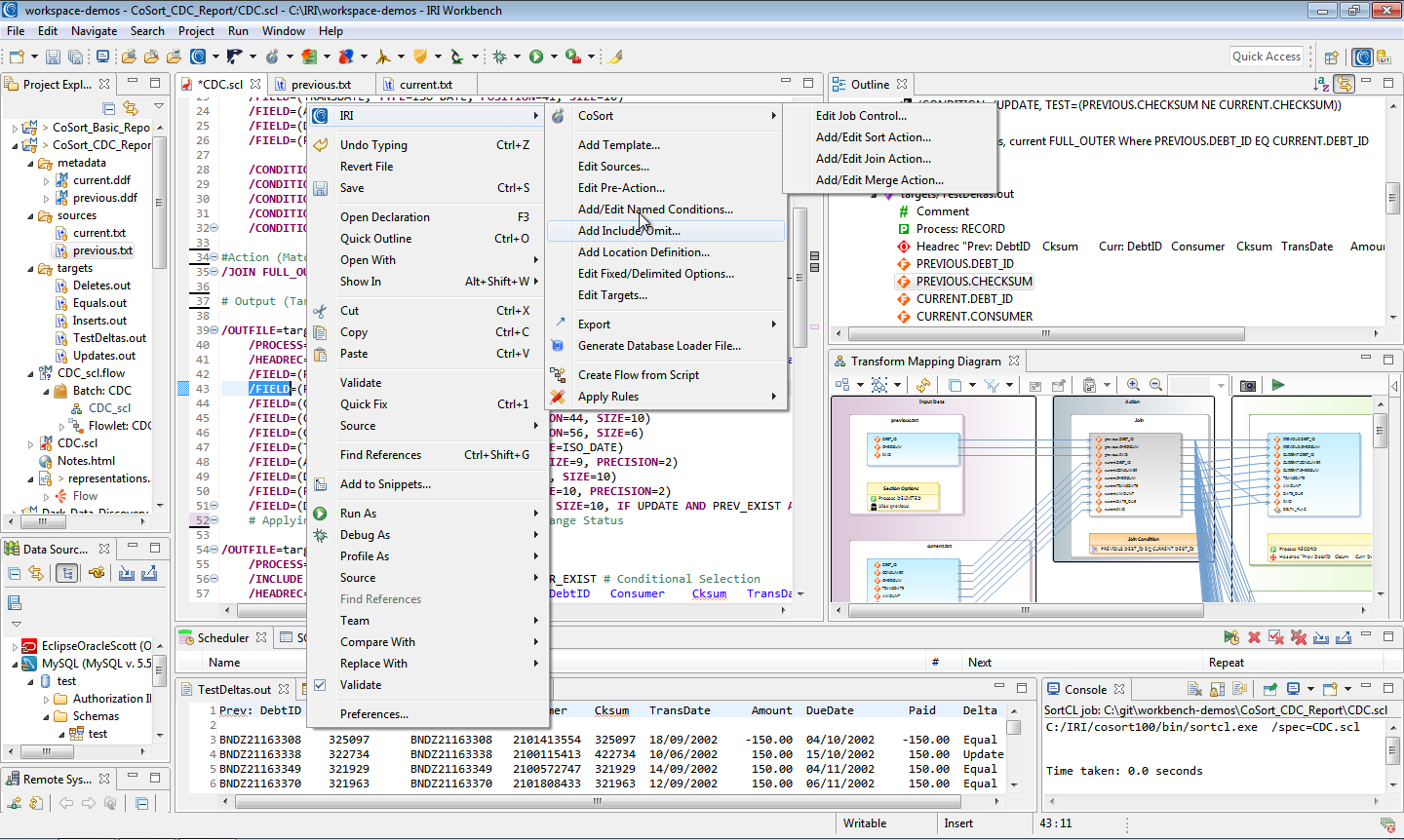
CoSort Version 9.5 now also provides a free, easy-to-use graphical alternative to command-line operations for developing, reviewing, and deploying SortCL jobs. The new IRI Workbench is a plug-in to the Eclipse Integrated Development Environment (IDE) that helps CoSort users create, maintain, and execute SortCL jobs. The IRI Workbench provides several new functional and ergonomic features.

Job wizards, form dialogs and syntax-aware script editing

The new Workbench leverages several different job presentation facilities within Eclipse to improve the SortCL job design experience. The wizards take you from source and metadata specification through the action phase of a job and the specification of one or more targets and formats. Wizard and form dialog results help populate and modify SortCL job scripts. A synatx-aware editor also faciliates valid script creation and change.

The top window in the figure below shows the editor view of a join job script. You can invoke the join wizard (shown in the bottom left) from the main menu and within the script editor view. The join wizard allows you to specify all details of a multi-table join action. The bottom right window shows the target field layout of this job script. Note that multiple input sources (shown in upper tabs) and output targets (shown in lower tabs) are presented in this view to enable you to specify file and table target layouts quickly and efficiently.

ODBC-connected (database table) data sources and targets

The introduction of ODBC source and target handling in CoSort 9.5 means that SortCL users can integrate, stage, transform, protect, and report against relational data stored in Oracle, DB2, SQL Server, SAP, MySQL, Sybase, and other tables. The Workbench uses the JDBC-ODBC bridge in the Eclipse Data Tools Platform (DTP) for viewing and selecting table data.

In the graphic below, the left panel shows the DTP view of the database. The middle panel displays the contents of the selected table, and the right panel is the Data Definition File (DDF) form editor that is used to modify the table metadata specifications for a SortCL job.

Metadata discovery

Those familiar with CoSort know that you must define the structure of all input and output files in SortCL DDF syntax. This has traditionally been a manual field-by-field editing process, or the result of a command line conversion program like cob2ddf (for COBOL copybooks). For situations in which pre-existing metadata is not available, the IRI Workbench helps users to visually define their field layouts and populate file and table metadata for use in SortCL jobs.

The following screenshot shows how users can define fixed-position fields by moving sliders to the start and end of each field in a source data preview window. Once you add a field, the bottom spreadsheet view reflects the DDF specifications which you can then modify. For records with delimited fields, a column-based editor is provided instead, as sliders are unnecessary. A HEX view option facilitates the definition of binary data.

Metadata conversion

The process of bulk metadata and third-party sort script migration to CoSort's SortCL syntax has been modernized and automated in the IRI Workbench. Wizards exist to translate both third-party data layouts into SortCL DDFs, and third-party sort parms into SortCL job scripts. An example of the former would be bulk COBOL copybook conversions to SortCL .ddf targets. There is a wizard to convert one or more metadata repositories or file headers into DDF. There is also a wizard to convert and import third-party sort specifications (e.g. JCL sort parm for z/OS MVS or VSE) into SortCL job scripts.

The conversion wizard shown below demonstrates the conversion of one or more mainframe sort decks to SortCL job scripts. You can browse to identify the location of the parms, and then automatically convert them for use in SortCL. The middle window shows advanced options available for these conversions. The bottom window shows from left to right: project explorer files (including the source and target job scripts), an editor displaying the source job script, a display of the target job script, and a tree view of the components of the target job script.


Where Can I Get More Information on SortCL?
Here: Products > CoSort > SortCL
SortCL plays in an integral role in almost every Solution area described on this web site. Click to read about SortCL's role in:
Business Intelligence
Data Governance
Data Transformation
ETL/DB Acceleration
Field Protection
File Interchange
Sort Migration
See also:
Products > CoSort
     Products > CoSort > SortCL Metadata
     Products > CoSort > Metadata Converters
     Products > CoSort > Dashboard
     Products > CoSort > COBOL Tools
     Products > CoSort > APIs
Products > Fast Extract (FACT)
Products > FieldShield (Data Privacy)
Products > RowGen (Test Data)


Request More Info:

* IRI WILL NOT share this info