
SortCL
SortCL is the core data manipulation program and popular user interface for managing structured data in most IRI software products today. First introduced with IRI CoSort in 1992 as a Sort Control Language for mainframe (JCL sort) migrations, SortCL is now also:
- an award-winning, multi-purpose fourth generation data definition and manipulation language (4GL)
- the name of the standalone data handling executable that follows those 4GL instructions
- a callable library routine that the executable (or your 3GL program) calls internally to process data
SortCL scripts and jobs describe and consolidate data mappings and manipulations. They support many data source and target formats (including custom reports) in IRI CoSort and its spin-off products:
- IRI NextForm, for data and DB migration and replication
- IRI FieldShield, for PII classification, masking, and auditing
- IRI RowGen, for synthetic test data generation and population
- IRI Voracity, which includes all of the above, supporting and combining multiple data profile/search, integration (ETL), migration, governance, and analytic use cases. The Hadoop-enabled edition of Voracity can also run several SortCL programs interchangeably in MapReduce 2, Spark, Spark Stream, Storm, and Tez.
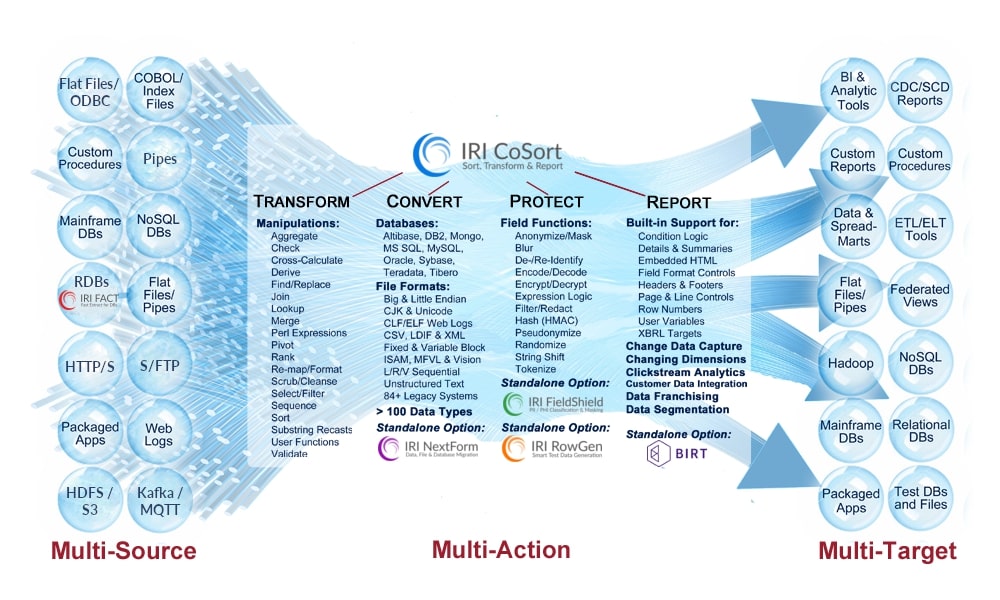
SortCL is therefore what makes CoSort and Voracity a one-stop, one-I/O "super tool" for data transformation, conversion, cleansing, mapping, and reporting. SortCL's extensive data movement and manipulation capabilities -- detailed in the tabs above, and listed in the diagram below -- can run in a single job and pass through huge volumes of data.
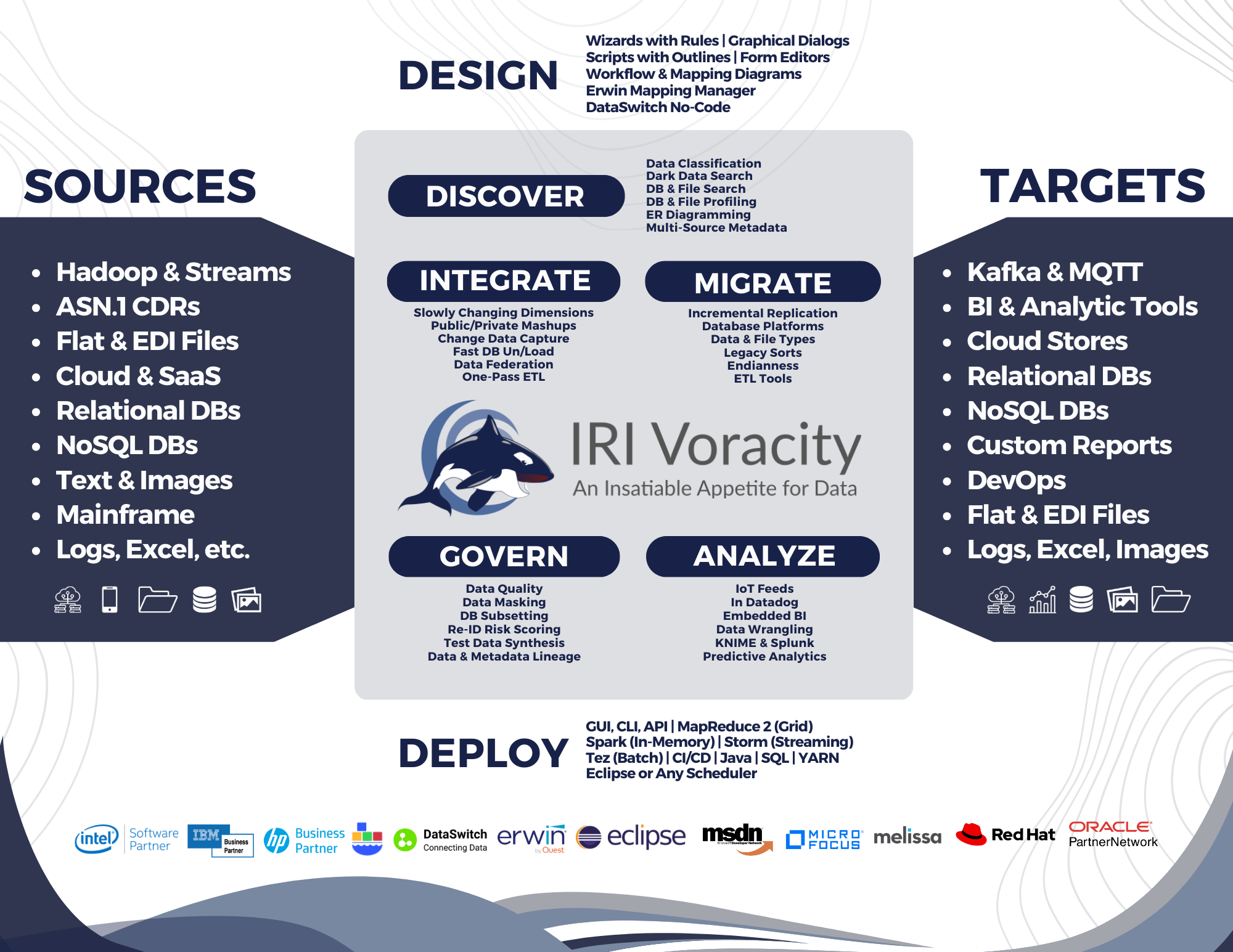
SortCL performs the same tasks for Voracity licensees, who can see them illustrated in modern transform mapping diagrams. ETL and solution architects with big data appreciate its ability to combine data integration, remapping, cleansing, masking, testing, and BI operations, and the dramatic differences it makes in information delivery and compliance outcomes:
No Experience Necessary
SortCL uses an open, explicit metadata to define, manipulate and reformat data in more than 150 disparate file and database sources. SortCL syntax is self-documenting; anyone can read, recognize, and modify SortCL programs with ease.
SortCL uses simple English statements based originally on VMS sort parms, and also familiar SQL, C, and PCRE syntax. Unlike cryptic ETL, 3GL, and MapReduce programs, no training is needed to understand what a SortCL script will do.
But for those who cannot or simply will not learn another language, there's a powerful GUI to save them from it. IRI Workbench is a graphical integrated development environment (IDE), built on Eclipse,™ for creating, running, sharing, and modifying SortCL jobs, and their "data definition file (DDF)" source and target layouts.
Did You Know?
SortCL was introduced in 1992. It remains so widely adopted because it is uniquely explicit, open, and powerful. SortCL has met its design goals to be:
- modular, so you can keep adding functions into the same I/O pass
- extensible enough for complex data transformations and reporting
- clear so that anyone can create, read, re-use, and expand its jobs
- familiar to JCL users, SQL-savvy DBAs, and DW/BI data architects
- faster than SQL and ETL tools, without the DB or server overhead
- executed (not compiled!) in real-time, batch, CLI, API, and GUI ops
- portable, so its jobs run on all Unix, Linux, and Windows platforms
- integrated easily into new applications, SaaS uses, or ASP models
SortCL job scripts perform, speed, and/or combine: big data transformation, conversion, protection, and BI in the world's largest production environments.
Metadata Interoperability
Quickly find and re-use SortCL metadata in multiple IRI products and projects to meet your data processing, protection, presentation, and prototyping requirements. Use SortCL job scripts and DDF layouts across the IRI ecosystem, and manage their use and lineage directly in Eclipse or available cloud repositories like Git, CVS, and SVN.
SortCL DDF is also compatible with the: DataSwitch no-code data engineering web application, Quest (formerly ERwin and AnalytiX DS) Mapping Manager, and Meta Integration Model Bridge (MIMB) from Meta Integration Technology, Inc. Their support for IRI DDF metadata allows you to convert data layouts in your BI, CRM, database, ETL, and modeling tools so it can be easily re-purposed for use with IRI software. This preserves your investment in existing metadata, but accelerates your ability to leverage the performance, functional, or financial benefits of IRI software that can now run with (or instead of) your legacy applications.
