
|
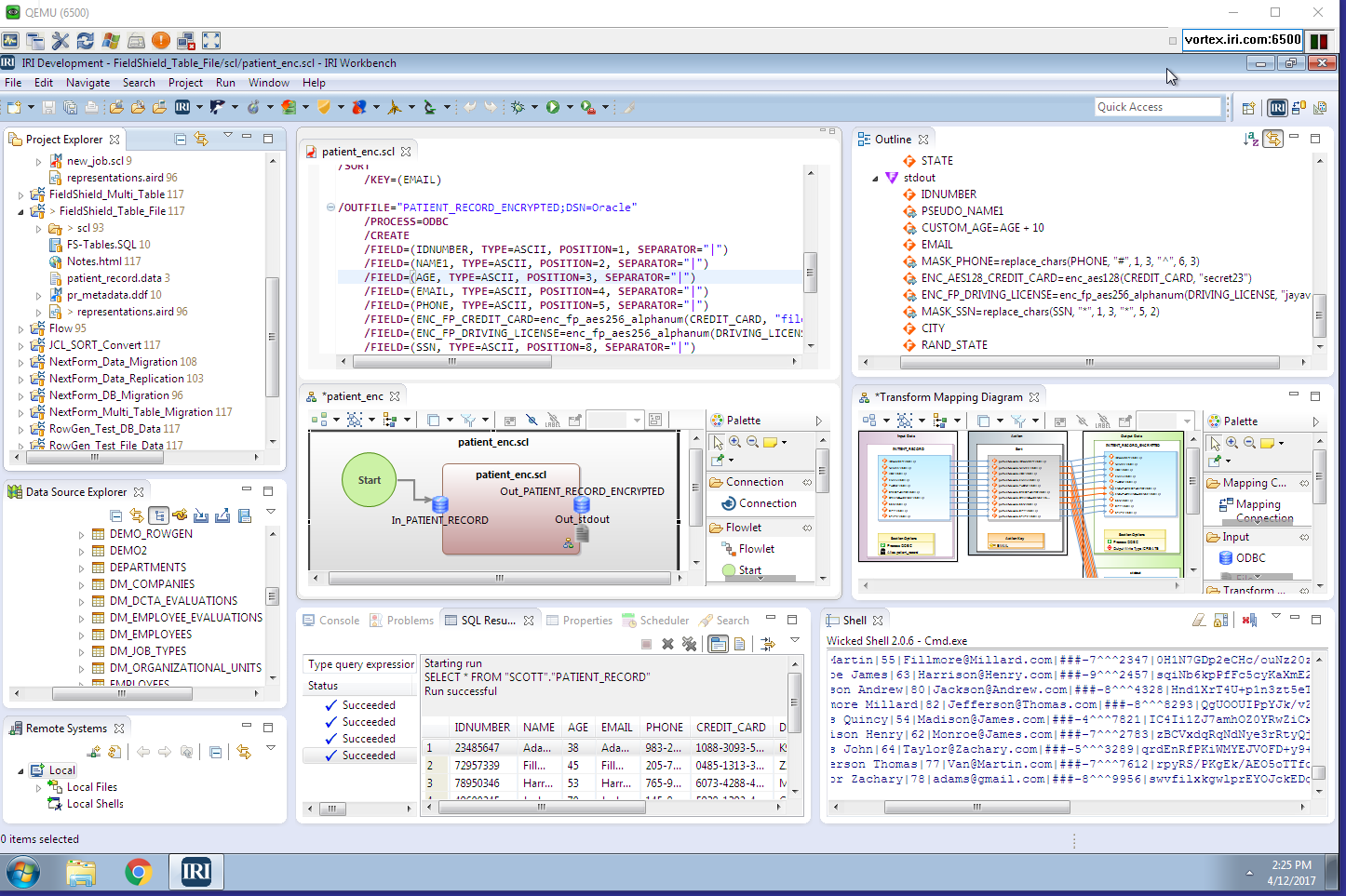
IRI Workbench
Creates and Runs FieldShield Jobs
Background
FieldShield
— IRI's data encryption and data masking tool for personally identifying information (PII) — secures data in flat files at the field level, and relational database tables at the column level. FieldShield uses the power of the CoSort Sort Control Language (SortCL) program, and its data definition file (DDF) metadata to define and manipulate protections for PII across a range of platforms and business needs.
These data and job definitions, along with their modification and execution, can be run from the command line, within batch scripts, from application programs, SQL procedures (through custom in-situ encryption routines), and now, from the IRI Workbench -- a powerful GUI built on Eclipse that DBAs and compliance teams can use for visual job development and execution. The IRI Workbench also supports SortCL data transformation and reporting, as well as Fast Extract (FACT) for rapidly unloading the above databases for ETL, reorg, field protection, and archive purposes.
Because FieldShield features are front-ended in the IRI Workbench, developers and compliance teams can create jobs with: metadata discovery, conversion and search tools; a help-enabled job wizard; and, a dynamic job outline linked back to the GUI dialogs. A syntax-aware editor exists for those who prefer scripts for job design and modification.
A Closer Look
FieldShield users can get up to speed quickly from the IRI Workbench's Welcome screen. First Steps include a getting started "cheat sheet" that links to a new data protection job wizard. Context-sensitive help in the wizard guides users step-by-step through FieldShield job definition where data sources, protection functions, and output targets (and new formats, if any) are specified.

Once FieldShield jobs are defined, they can be executed from the Workbench run menus; either standalone or in a batch sequence. FieldShield jobs can run subsequent to a FACT unload, or prior to a CoSort sort and bulk RDBMS load.
Following are just a few of the FieldShield components in the IRI Workbench.
Field Encryption and Decryption
After defining their input sources and metadata, users can choose from the menu of protection functions in the output target field layout editor illustrated above. The first choice in the drop-down menu is for encryption (or decryption), which brings up this dialog:

A list of the field names from each input source is known to the dialog, where a given encryption or decryption function can be selected to conceal or reveal the named field. 128 and 256-bit AES (with or without source field format preservation), GPG, OpenSSL, 3DES are included functions, and you can specify your own.
Data Masking
FieldShield users can choose from default data masks for particular fields like credit card and social security numbers, or specify their own custom masking characters and digit offsets to mask entire fields, or just parts of them.
Remember that masking data in this way renders the results unrecoverable because no underlying encoding information is available after the data are masked.
Pseudonymization
In order to protect real names, places, or other values with realistic results, it's best to use a lookup table to assign fake, but still real-looking values to each source value. FieldShield users can choose from two different methods of using pseudonyms:

FieldShield supports the unrecoverable use of randomly selected pseudonyms, as well as set files or look-up tables that can be used to display and reverse pseudonyms associated with real values.
Display, Modify, Share, and Run FieldShield Jobs
After the wizard is completed, a new FieldShield job script is opened and available for review and modification -- either in the syntax-aware editor or the same GUI dialogs linked from a visual outline of the job.

The 'Run' menu provides ad hoc and batch execution options for deploying FieldShield jobs on the local Windows, or remote Windows or Linux platform.
Some of the other convenient aspects of using FieldShield from the IRI Workbench include:
Feature |
Purpose |
| Project Manager |
Management input and output files, job scripts, and metadata |
| Text Search |
Metadata impact analysis |
| Team Plug-Ins |
Sharing and version control |
| Data Tools Platform |
Browsing and populating DBs |
| CoSort Integration |
Easily add transformation, conversion, and reporting functions to FieldShield jobs |
Where Can I Get More
Information on FieldShield?
Here: Products > FieldShield
IRI's FieldShield
technology plays an integral role
in many of the solutions described throughout the IRI
web site.
The standalone FieldShield product or FieldShield functions embedded in CoSort can be used to secure data at risk during any of the activities discussed in IRI's solution stack.
Did you know for example that, regardless of the source platform (table or file), FieldShield output can be sent to tables and files simultaneously, formatted into custom reports, or handed off in CSV or XML format to BI tools? The IRI Workbench can also facilitate those processes.
See also:
Solutions > Field Protection
Products > FieldShield
Products
> CoSort
Products
> CoSort > SortCL Metadata
Products
> CoSort > Metadata Converters
Products
> CoSort > Dashboard
Products
> CoSort > COBOL Tools
Products
> CoSort > APIs
Products
> Fast Extract (FACT)
Products
> RowGen (Test Data)
|